Change Notification Signatures in WootRecruit Hub
Note: Some notification templates purposefully use the Owners name as the sender to create a more dynamic and organic applicant experience.
To modify the message notification signature for the owner of a subaccount in WootRecruit Hub, follow these clear and concise steps:
- Access the Agency Level:
- Log into your WootRecruit Hub.
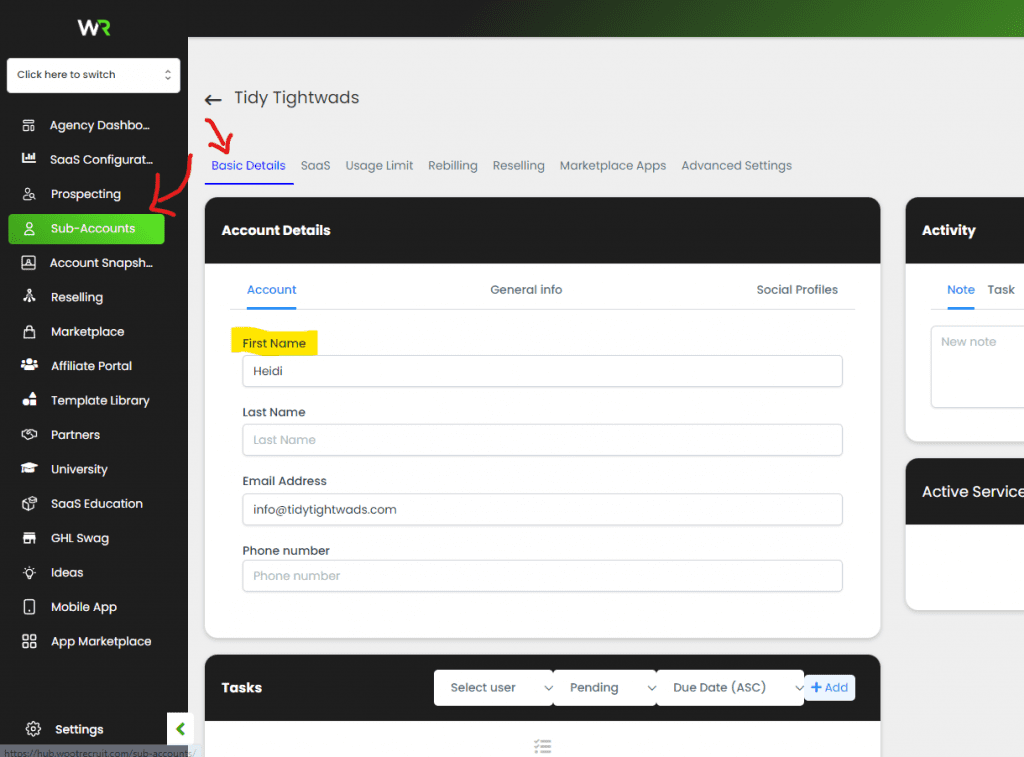
- Select “Subaccounts” from the main menu.
- Locate the Subaccount:
- Use the search function to find the specific subaccount you wish to update.
- Update Account Details:
- Click on “Basic Details”.
- Proceed to “Account Details”.
- Change the “First Name” and “Last Name” to the new desired name (e.g., use “Mike Smith” or “Maria Smith” as an alias).
This adjustment allows the subaccount owner to maintain privacy by using an alias instead of their real name, without altering the global notification templates.